- Admin
- #1
If you would like to share your uploaded attachments within your posts as full images, here is an easy guide on how to achieve this.
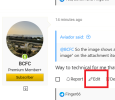
First select EDIT post (highlighted here)
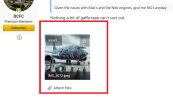
Once you have access to edit your post, go to the base of the post where your attachment will be displayed (highlighted here) and click on where it says insert...
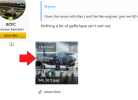
Once you have selected insert... you will be offered a choice of Thumbnail or Full Image. When you have made your selection the image will display immediately within your post. Once that's done you can repost your message as you would normally.
That completes your how to show your attachments as full images within your post.
First select EDIT post (highlighted here)
Once you have access to edit your post, go to the base of the post where your attachment will be displayed (highlighted here) and click on where it says insert...
Once you have selected insert... you will be offered a choice of Thumbnail or Full Image. When you have made your selection the image will display immediately within your post. Once that's done you can repost your message as you would normally.
That completes your how to show your attachments as full images within your post.
Last edited: